Building a Fan-Out/Fan-In Video Analytics Pipeline with Savant
Introduction
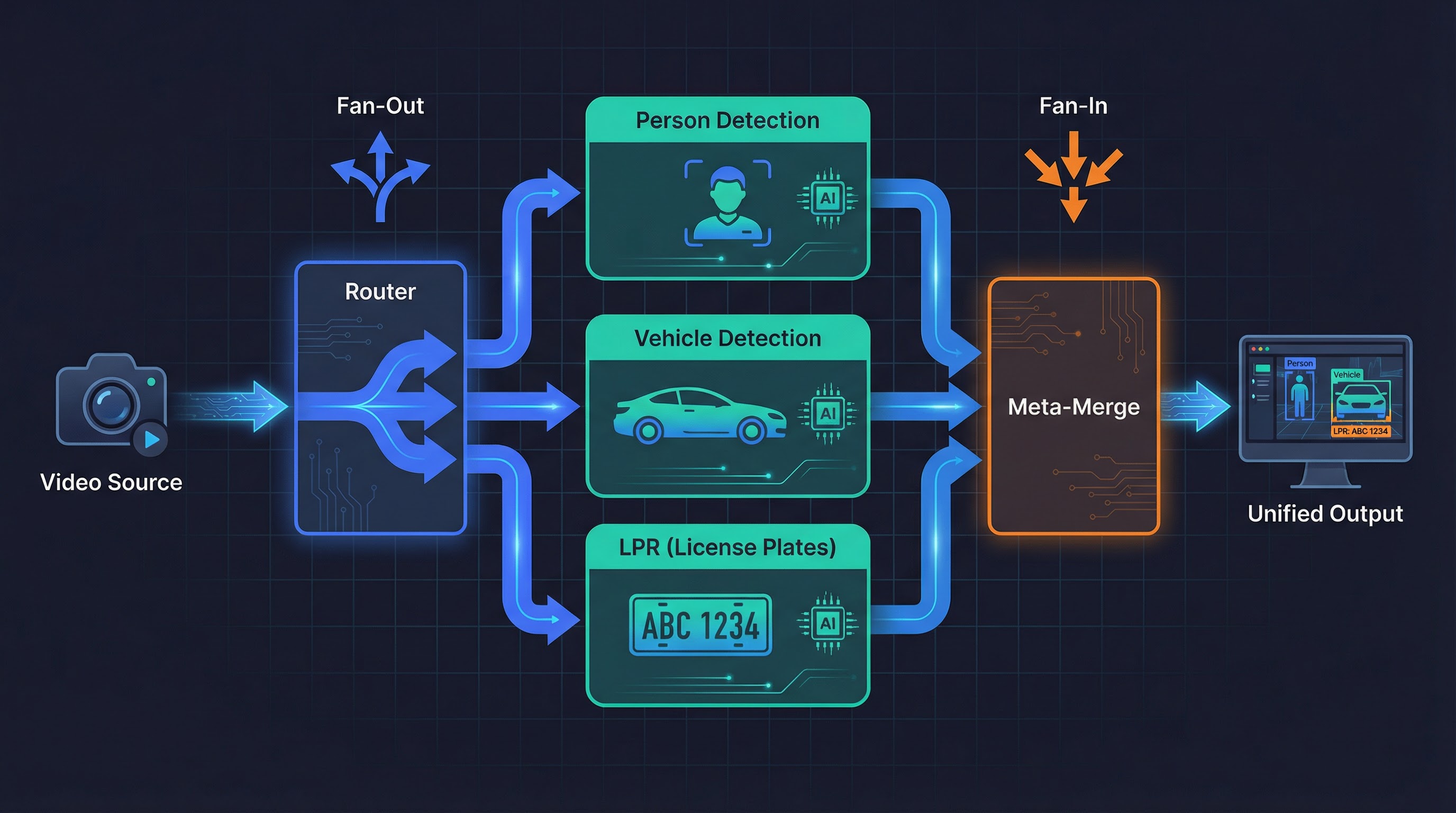
Most video analytics pipelines follow a linear pattern: ingest a frame, run inference, output results. But real-world scenarios often require parallel processing — fanning a single video stream out to multiple independent pipelines and then merging their metadata back into a unified result.
Consider a typical production setup: a single camera feed needs person detection, vehicle detection, and license plate recognition simultaneously. Each task runs in its own Savant module — possibly on different hardware or with different model architectures — but the final consumer (a dashboard, an alerting system, a video archive) needs a single, coherent frame that carries all of these annotations together. This is the problem the meta-merge service solves: it collects frames that have been independently enriched by parallel branches and reunites their object metadata onto one canonical frame.
Why This Sample Splits the Frame Spatially
In production, the parallel branches typically operate on the same top-level ROI — the full frame, or the same region of interest. Each branch adds its own kind of objects (persons from one model, vehicles from another), and the merge simply combines them. The correctness of such a merge is hard to verify visually: you would need to know which objects came from which branch.

This sample deliberately takes a different approach. Instead of running different models on the same region, it splits each frame into left and right halves and runs the same YOLOv11 detector on each half independently. This spatial split is a pedagogical design choice that makes merge correctness immediately visible:
- If you see person detections on both the left and right halves of the output frame, the merge clearly succeeded — each half’s results were correctly imported.
- If detections appear only on one side, the merge failed, and you know exactly which branch is broken.
- Synthetic marker objects with identical drift patterns and confidence values are placed in both ROIs by the router, providing an additional visual proof: matching markers confirm the object trees were reunited faithfully.
The same meta-merge infrastructure demonstrated here works identically when multiple pipelines share a single ROI and contribute different object types. Only the router and merge handlers change — the framework, the transport, the Docker Compose topology, and the E2E test strategy all remain the same.
What We Will Build
This article walks through building the complete sample with Savant and savant-rs, an open-source framework for high-performance video analytics:
- A router that assigns left/right ROI objects to each frame and routes copies to two parallel modules
- Two detector modules running YOLOv11 on their respective ROIs
- A meta-merge service that reunites detection results onto a single frame
- Declarative visualization with annotated bounding boxes
- An automated end-to-end test that validates merge correctness
By the end, you will have a six-service Docker Compose application that runs on both Jetson (L4T) and x86 with discrete GPUs, plus a test harness that can run in CI.
                         ┌─ module-left  ─┐
video-loop-source → router                 ├→ meta-merge → visualization → always-on-sink
                         └─ module-right ─┘
Here is what the running pipeline looks like — left/right ROIs with YOLO detections and synthetic markers overlaid on the merged output frame:
Prerequisites
- Docker with Compose v2+
- An NVIDIA GPU with drivers installed (Jetson or x86 dGPU)
- Basic familiarity with Docker Compose, ZeroMQ concepts, and YAML
All code referenced in this article lives under
samples/meta_merge/.
Step 1: Define the Directory Layout
Good organisation pays for itself quickly when a sample has many moving parts. Here is the structure we will build:
meta_merge/
├── docker-compose.l4t.yml          # Base — Jetson images, all config
├── docker-compose.x86.yml          # x86 dGPU — extends l4t
├── docker-compose.x86-test.yml     # E2E test — replaces source/sink
├── src/
│   ├── router/
│   │   ├── config.json             # Router socket & handler config
│   │   └── handler.py              # Creates left/right ROI objects
│   ├── detector/
│   │   ├── module.yml              # YOLOv11n pipeline definition
│   │   ├── roi_ingress_filter.py   # Removes the "wrong" ROI per instance
│   │   └── roi_resolver.py         # ${py:} resolver for ROI input object
│   ├── meta_merge/
│   │   ├── config.json             # Meta-merge socket & callback config
│   │   ├── module.py               # Merge, ready, expired handlers
│   │   └── roi_constants.py        # Shared string constants
│   └── visualization/
│       └── module.yml              # Declarative draw_func
└── test/
    ├── Dockerfile                  # savant-rs + PyTorch + Ultralytics
    ├── source.py                   # Ground-truth source
    ├── sink.py                     # IoU comparison sink
    └── create_test_image.py        # Downloads a test image
The key design principle: one source of truth. docker-compose.l4t.yml
is the canonical definition. The x86 and test variants only override what
they must.
Step 2: Shared Constants
Before writing any service, extract the string literals that multiple
services will share into a single Python file. Duplicating labels like
"left_roi" across router, filter, and merge handlers is a guaranteed
source of silent, hard-to-debug mismatches.
# src/meta_merge/roi_constants.py

ROI_NAMESPACE = 'router'
LEFT_ROI_LABEL = 'left_roi'
RIGHT_ROI_LABEL = 'right_roi'
ROI_LEFT = 'left'
ROI_RIGHT = 'right'
VALID_ROIS = (ROI_LEFT, ROI_RIGHT)

EXPECTED_INGRESS_COUNT = 2
Every Python component imports from this file. But what about YAML config
files like the detector’s module.yml? Savant supports Python
resolvers — the ${py:module.path, function_name} syntax calls a
Python function at config load time and substitutes the return value. This
lets YAML configs reference the same shared constants instead of
duplicating string literals.
We use this in the detector pipeline to derive the ROI input object name
from roi_constants.py:
# src/detector/roi_resolver.py
import os
from samples.meta_merge.src.meta_merge.roi_constants import (
    LEFT_ROI_LABEL, RIGHT_ROI_LABEL, ROI_LEFT, ROI_NAMESPACE,
)

def roi_input_object() -> str:
    roi = os.environ.get('MODULE_ROI', 'left').lower()
    label = LEFT_ROI_LABEL if roi == ROI_LEFT else RIGHT_ROI_LABEL
    return f'{ROI_NAMESPACE}.{label}'
Then in module.yml, instead of hardcoding router.${oc.env:MODULE_ROI}_roi:
input:
  object: ${py:samples.meta_merge.src.detector.roi_resolver, roi_input_object}
This way the ROI namespace and label conventions are defined once in
roi_constants.py and consumed everywhere — Python handlers, ingress
filters, and YAML configs alike.
Step 3: The Router — Splitting the Frame
The router is a savant-rs service that receives a video stream and fans it out to multiple egress endpoints based on labels. Its configuration lives in two files: a JSON socket config and a Python handler.
Router Configuration (src/router/config.json)
The router config declares one ingress (the video source) and two egress
endpoints (left and right detector modules). Socket URLs use ${ENV_VAR}
templating so the same config works across compose variants:
{
    "ingress": [
        {
            "name": "ingress",
            "socket": { "url": "${ZMQ_INGRESS}" },
            "handler": "ingress_handler"
        }
    ],
    "egress": [
        {
            "name": "left",
            "socket": { "url": "${ZMQ_EGRESS_LEFT}" }
        },
        {
            "name": "right",
            "socket": { "url": "${ZMQ_EGRESS_RIGHT}" }
        }
    ],
    "common": {
        "init": {
            "python_root": "${PYTHON_MODULE_ROOT}",
            "module_name": "router",
            "function_name": "init",
            "args": null
        },
        "source_affinity_cache_size": 1000
    }
}
The "handler": "ingress_handler" tells the router to call a registered
Python handler for every incoming message.
Notice that the egress declarations have no "matcher" fields. When a
router egress omits the label matcher, every frame is duplicated to
that egress — both left and right receive an identical copy of the
frame. This is exactly what we want: each module gets the full frame
(with both ROIs attached) and then its ingress filter removes the ROI it
should not process.
Router Handler (src/router/handler.py)
The ingress handler’s job is to create ROI objects on each frame that tell downstream modules which region of the image to process:
from savant_rs import register_handler
from savant_rs.primitives.geometry import RBBox
from savant_rs.utils.serialization import Message
from meta_merge.roi_constants import LEFT_ROI_LABEL, RIGHT_ROI_LABEL, ROI_NAMESPACE

class IngressHandler:
    def __call__(
        self, message_id: int, ingress_name: str, topic: str, message: Message
    ) -> Message:
        frame = message.as_video_frame()
        if frame is None:
            return message

        width = frame.width
        height = frame.height

        # Remove all pre-existing objects and their subtrees.
        # MatchQuery.idle() matches everything; export_complete_object_trees
        # with delete_exported=True removes full trees (delete_objects does
        # NOT cascade — children would become orphaned).
        frame.export_complete_object_trees(MatchQuery.idle(), delete_exported=True)

        # Left half: (0, 0) to (width/2, height)
        left_bbox = RBBox.ltwh(0, 0, width / 2, height)
        frame.create_object(
            namespace=ROI_NAMESPACE,
            label=LEFT_ROI_LABEL,
            detection_box=left_bbox,
            confidence=1.0,         # Required by DeepStream!
        )

        # Right half: (width/2, 0) to (width, height)
        right_bbox = RBBox.ltwh(width / 2, 0, width / 2, height)
        frame.create_object(
            namespace=ROI_NAMESPACE,
            label=RIGHT_ROI_LABEL,
            detection_box=right_bbox,
            confidence=1.0,
        )

        return message

def init(params) -> bool:
    register_handler('ingress_handler', IngressHandler())
    return True
Critical detail: the confidence=1.0 parameter is mandatory for
objects that will be used as ROIs by DeepStream’s nvinfer. Omitting it
causes a TypeError at runtime because the DeepStream metadata layer
expects a float, not None.
The handler also creates synthetic marker objects as children of each ROI — small squares with a Lissajous drift pattern and random confidence. These markers let users visually verify that the merge is working correctly: if both markers appear on the final frame with matching positions and confidence, the merge succeeded.
Documentation:
VideoFrame.create_object,RBBox
Step 4: The Detector Modules — Parallel Inference
Each detector module is a standard Savant DeepStream pipeline that runs
YOLOv11n. The same module.yml is used for both module-left and
module-right — the MODULE_ROI environment variable controls which half
each instance processes.
Detector Pipeline (src/detector/module.yml)
The pipeline definition wires up the YOLO model and tells it which ROI object to use as input:
pipeline:
  source:
    element: zeromq_source_bin
    properties:
      socket: ${oc.env:ZMQ_SRC_ENDPOINT}
    ingress_frame_filter:
      module: samples.meta_merge.src.detector.roi_ingress_filter
      class_name: ROIIngressFilter
      kwargs:
        roi: ${oc.env:MODULE_ROI, 'left'}
  elements:
    - element: nvinfer@detector
      name: yolov11n
      model:
        format: onnx
        model_file: yolo11n.onnx
        input:
          object: ${py:samples.meta_merge.src.detector.roi_resolver, roi_input_object}
          shape: [3, 640, 640]
        output:
          num_detected_classes: 80
          objects:
            - class_id: 0
              label: person
            - class_id: 2
              label: car
            # ... more classes
Two things to note:
input.objectuses a${py:}resolver to callroi_input_object()at config load time, which reads theMODULE_ROIenvironment variable and returns the fully qualified ROI name (e.g.,router.left_roi) from the sharedroi_constants.py. No string literals to keep in sync.ingress_frame_filterruns before any pipeline element and removes the ROI that this module instance should not process.
Ingress Filter (src/detector/roi_ingress_filter.py)
The filter removes the “wrong” ROI and its children (such as the synthetic markers created by the router). This prevents the left module from processing right-half objects and vice versa:
from savant.base.frame_filter import BaseFrameFilter
from savant_rs.match_query import MatchQuery, StringExpression

class ROIIngressFilter(BaseFrameFilter):
    def __init__(self, roi: str, **kwargs):
        super().__init__(**kwargs)
        self.roi = roi.lower()

    def __call__(self, video_frame) -> bool:
        remove_label = RIGHT_ROI_LABEL if self.roi == ROI_LEFT else LEFT_ROI_LABEL

        query = MatchQuery.or_(
            # The wrong ROI itself
            MatchQuery.and_(
                MatchQuery.namespace(StringExpression.eq(ROI_NAMESPACE)),
                MatchQuery.label(StringExpression.eq(remove_label)),
            ),
            # Any children parented to the wrong ROI
            MatchQuery.parent_label(StringExpression.eq(remove_label)),
        )
        video_frame.delete_objects(query)
        return True
The MatchQuery.or_() approach works here because the object hierarchy is
only one level deep (ROI → children). For deeper trees, use
export_complete_object_trees(query, delete_exported=True)
which cascade-deletes at any depth.
Documentation:
MatchQuery,BaseFrameFilter
Step 5: The Meta-Merge Service — Reuniting the Results
After both modules finish, their results need to be combined onto a single frame. The meta-merge service is a generic, Python-extendable merging framework built in Rust. It does not contain any domain-specific merge logic — all decisions are delegated to user-registered Python callbacks.
Meta-Merge Configuration (src/meta_merge/config.json)
The config is structurally different from the router’s. It has two ingress endpoints (one per module), a single egress, and a callbacks block that names the Python handlers:
{
    "ingress": [
        {
            "name": "left",
            "socket": { "url": "${ZMQ_INGRESS_LEFT}" },
            "eos_policy": "allow"
        },
        {
            "name": "right",
            "socket": { "url": "${ZMQ_INGRESS_RIGHT}" },
            "eos_policy": "deny"
        }
    ],
    "egress": {
        "socket": { "url": "${ZMQ_EGRESS}" }
    },
    "common": {
        "callbacks": {
            "on_merge": "merge_handler",
            "on_head_expire": "head_expired_handler",
            "on_head_ready": "head_ready_handler",
            "on_late_arrival": "late_arrival_handler",
            "on_unsupported_message": "unsupported_message_handler"
        },
        "queue": { "max_duration": { "secs": 5, "nanos": 0 } }
    }
}
Key concepts:
eos_policy: Controls End-of-Stream forwarding. Only one ingress should have"allow"— the Rust config loader enforces this to prevent duplicate EOS delivery.queue.max_duration: How long a frame can wait for all ingresses to contribute before it’s considered “expired” and forwarded anyway.
Merge Handlers (src/meta_merge/module.py)
Each callback is a class with a __call__ method, registered by name
during init(). The central piece is the MergeHandler:
class MergeHandler:
    def __call__(
        self,
        ingress_name: str,
        topic: str,
        current_state: EgressItem,
        incoming_state: Optional[EgressItem],
    ) -> bool:
        if incoming_state is not None:
            current_frame = current_state.video_frame
            incoming_frame = incoming_state.video_frame

            # Export ROI object trees (parent + all children)
            roi_query = MatchQuery.and_(
                MatchQuery.namespace(StringExpression.eq(ROI_NAMESPACE)),
                MatchQuery.label(
                    StringExpression.one_of(LEFT_ROI_LABEL, RIGHT_ROI_LABEL)
                ),
            )
            trees = incoming_frame.export_complete_object_trees(
                roi_query, delete_exported=False
            )

            if trees:
                current_frame.import_object_trees(trees)

        # Track which ingresses have contributed
        received = current_state.state.get('received_ingresses', set())
        received.add(ingress_name)
        current_state.state['received_ingresses'] = received

        # Return True when all ingresses have reported in
        return len(received) >= EXPECTED_INGRESS_COUNT
Understanding the two-call lifecycle is key to understanding the merge:
First arrival (say, from module-left): The meta-merge service
creates a new EgressItem for this frame’s PTS and calls MergeHandler
with incoming_state=None — there is nothing to merge yet because this
is the first copy. The handler skips the if block, records "left" in
received_ingresses, and returns False (only 1 of 2 ingresses have
reported). The frame now sits in the merge queue, waiting.
Second arrival (from module-right, same PTS): The service calls
MergeHandler again, but this time current_state is the
already-queued item (carrying module-left’s objects) and
incoming_state is the newly arrived copy from module-right. Now the
handler enters the if block: it exports the ROI object trees
(the right ROI and all its child detections) from the incoming frame and
imports them into the current frame. After recording "right" in
received_ingresses, it returns True — all ingresses have reported,
and the merged frame is ready to send.
The EgressItem.state dict (used here for received_ingresses) persists
across these calls for the same frame, making it the natural place to
track merge progress.
The other callbacks handle edge cases:
HeadReadyHandler: Called when the merge is complete. Returnsstate.video_frame.to_message()to forward the merged frame.HeadExpiredHandler: Called whenmax_durationelapses. Forwards the partial result anyway.LateArrivalHandler: Called when a frame arrives after its slot was already sent. Logs and discards.
Documentation:
export_complete_object_trees,import_object_trees
Step 6: Declarative Visualization
The visualization module draws bounding boxes on the merged frame. Instead
of writing a custom draw function in Python, Savant supports a fully
declarative approach using rendered_objects in the module YAML:
# src/visualization/module.yml
parameters:
  draw_func:
    rendered_objects:
      router:
        left_roi:
          bbox:
            border_color: 'FF000044'    # Red, semi-transparent
            background_color: 'FF000010'
            thickness: 1
          label:
            format: ['{label}']
            font_color: 'FF0000FF'
        right_roi:
          bbox:
            border_color: '0000FF44'    # Blue, semi-transparent
            background_color: '0000FF10'
            thickness: 1
          label:
            format: ['{label}']
            font_color: '0000FFFF'
        marker:
          bbox:
            border_color: 'FFD700FF'    # Gold
            thickness: 2
          label:
            format: ['{label} {confidence:.2f}']
      yolov11n:
        person:
          bbox:
            border_color: '00FF00FF'    # Green
            thickness: 2
          label:
            format: ['{label} {confidence:.2f}']

pipeline:
  elements: []    # No processing — just draw and forward
The element name (router, yolov11n) must match the object’s
namespace, and the label (left_roi, person) must match the object’s
label. Colours are RRGGBBAA hex strings. Available label placeholders
include {model}, {label}, {confidence}, and {track_id}.
The pipeline has zero elements — this module only draws and encodes.
Documentation:
NvDsDrawFunc— look at other samples likepeoplenet_detectororyolov11_segfor morerendered_objectsexamples.
Step 7: Docker Compose — Wiring It All Together
The Base Compose (L4T)
The docker-compose.l4t.yml is the single source of truth. It defines
every service, every volume, every environment variable, and every
dependency:
services:
  video-loop-source:
    image: ghcr.io/insight-platform/savant-adapters-gstreamer-l4t:latest
    volumes:
      - zmq_sockets:/tmp/zmq-sockets
    environment:
      - ZMQ_ENDPOINT=dealer+connect:ipc:///tmp/zmq-sockets/input-video.ipc
      - SOURCE_ID=video
    depends_on:
      always-on-sink:
        condition: service_started

  router:
    image: ghcr.io/insight-platform/savant-router-arm64:savant-latest
    volumes:
      - ./src/router/config.json:/opt/etc/configuration.json:ro
      - ./src:/opt/python:ro
      - zmq_sockets:/tmp/zmq-sockets
    environment:
      - ZMQ_INGRESS=router+bind:ipc:///tmp/zmq-sockets/input-video.ipc
      - ZMQ_EGRESS_LEFT=dealer+bind:ipc:///tmp/zmq-sockets/left.ipc
      - ZMQ_EGRESS_RIGHT=dealer+bind:ipc:///tmp/zmq-sockets/right.ipc
    depends_on:
      module-left:
        condition: service_healthy
      module-right:
        condition: service_healthy

  module-left:
    image: ghcr.io/insight-platform/savant-deepstream-l4t:latest
    command: samples/meta_merge/src/detector/module.yml
    environment:
      - ZMQ_SRC_ENDPOINT=router+connect:ipc:///tmp/zmq-sockets/left.ipc
      - ZMQ_SINK_ENDPOINT=dealer+connect:ipc:///tmp/zmq-sockets/meta_merge_left.ipc
      - MODULE_ROI=left
    runtime: nvidia

  module-right:
    # Same image and command as module-left, but connects to different sockets
    environment:
      - ZMQ_SRC_ENDPOINT=router+connect:ipc:///tmp/zmq-sockets/right.ipc
      - ZMQ_SINK_ENDPOINT=dealer+connect:ipc:///tmp/zmq-sockets/meta_merge_right.ipc
      - MODULE_ROI=right
    depends_on:
      module-left:
        condition: service_healthy

  meta-merge:
    image: ghcr.io/insight-platform/savant-meta-merge-arm64:savant-latest
    volumes:
      - ./src/meta_merge/config.json:/opt/etc/configuration.json:ro
      - ./src/meta_merge:/opt/python:ro
    environment:
      - ZMQ_INGRESS_LEFT=router+bind:ipc:///tmp/zmq-sockets/meta_merge_left.ipc
      - ZMQ_INGRESS_RIGHT=router+bind:ipc:///tmp/zmq-sockets/meta_merge_right.ipc
      - ZMQ_EGRESS=dealer+bind:ipc:///tmp/zmq-sockets/meta_merge_output.ipc
    depends_on:
      module-left:
        condition: service_healthy
      module-right:
        condition: service_healthy

  visualization:
    command: samples/meta_merge/src/visualization/module.yml
    environment:
      - ZMQ_SRC_ENDPOINT=router+connect:ipc:///tmp/zmq-sockets/meta_merge_output.ipc
      - ZMQ_SINK_ENDPOINT=dealer+bind:ipc:///tmp/zmq-sockets/output-video.ipc
    depends_on:
      meta-merge:
        condition: service_started

  always-on-sink:
    ports: ["554:554", "1935:1935", "888:888", "8889:8889"]
    environment:
      - ZMQ_ENDPOINT=router+connect:ipc:///tmp/zmq-sockets/output-video.ipc
    depends_on:
      visualization:
        condition: service_healthy

volumes:
  zmq_sockets:
(Abbreviated for clarity — see the full file for all properties.)
Startup Order
The depends_on chain ensures the pipeline is ready before any frames
flow:
module-left ──┐                               ┌── always-on-sink ── video-loop-source
              ├→ router ── meta-merge → visualization
module-right ─┘
Modules start first and become healthy (their built-in healthcheck hits
http://localhost:8080/status and waits for "running"). Only then does
the router start — followed by meta-merge, visualization, the sink, and
finally the source.
Why the source starts last: if frames arrive before the pipeline is ready, they queue up and can cause timeouts or even crashes in the merge queue.
ZMQ Transport
All links use DEALER/ROUTER over IPC (Unix domain sockets). This gives reliable delivery with backpressure — essential for a pipeline where every frame must be processed:
| Link | Writer | Reader |
|---|---|---|
| source → router | dealer+connect |
router+bind |
| router → modules | dealer+bind |
router+connect |
| modules → meta-merge | dealer+connect |
router+bind |
| meta-merge → visualization | dealer+bind |
router+connect |
| visualization → sink | dealer+bind |
router+connect |
The general rule: the party receiving multiplexed streams usually must bind; the party handling a single stream connects. For more on Savant’s ZMQ patterns, see the Communication Sockets documentation.
The x86 Variant
The x86 compose extends the L4T base and only overrides what differs: images (x86 variants) and GPU access (dGPU instead of Jetson):
# docker-compose.x86.yml
services:
  module-left:
    image: ghcr.io/insight-platform/savant-deepstream:latest
    extends:
      file: docker-compose.l4t.yml
      service: module-left
    runtime: runc
    deploy:
      resources:
        reservations:
          devices:
            - driver: nvidia
              count: 1
              capabilities: [gpu]
On Jetson, GPU access is via runtime: nvidia. On x86 dGPU, it’s
runtime: runc plus deploy.resources.reservations.devices. The
runtime: runc is necessary to override the inherited runtime: nvidia
from the L4T base.
Docker Compose extends does inherit depends_on and other
attributes.
Tip: Always verify the resolved config with
docker compose -f docker-compose.x86.yml configto see exactly what Compose will run.
Step 8: Running the Demo
x86 (dGPU)
cd samples/meta_merge
docker compose -f docker-compose.x86.yml up
Jetson (L4T)
cd samples/meta_merge
docker compose -f docker-compose.l4t.yml up
Viewing the Stream
The always-on-sink publishes the annotated video via multiple protocols:
| Protocol | URL |
|---|---|
| RTSP | rtsp://localhost:554/stream/video |
| HLS | http://localhost:888/stream/video |
You should see the video with red/blue ROI overlays, green person detection boxes, and gold marker squares drifting smoothly within each half.
Step 9: Building the End-to-End Test
A demo is nice, but it doesn’t tell you whether the pipeline is correct. For that, we replace the video source and the RTSP sink with a deterministic test source and an automated test sink.
Test Architecture
              ┌─────────────────────────────────────────────────┐
test-source → │ router → modules → meta-merge → visualization   │ → test-sink
              └────────────────── blackbox ─────────────────────┘
The test source knows what it sent. The test sink checks what came out. Everything in between is treated as a blackbox.
Test Source (test/source.py)
The source:
- Loads a JPEG image and merges it side-by-side (L|R) to simulate a video which is sent in this demo (a side-by-side video).
- Runs YOLOv11 on the merged image to get ground-truth person detections.
- Stores the expected bounding boxes as a frame
attribute
(
source.person). - Sends the frame via ZMQ DEALER with the JPEG data as an extra argument.
# Key fragment — frame creation
frame = VideoFrame(
    source_id=source_id,
    framerate='30/1',
    width=width, height=height,
    content=VideoFrameContent.external(ExternalFrameType.ZEROMQ.value, None),
    transcoding_method=VideoFrameTranscodingMethod.Copy,
    codec='jpeg',
    keyframe=True,
    pts=rep,
)
frame.set_persistent_attribute(
    namespace='source', name='person', values=values,
)

msg = Message.video_frame(frame)
res = writer.send_message(source_id, msg, merged_bytes)
Note VideoFrameContent.external(ExternalFrameType.ZEROMQ.value, None) —
this tells the pipeline that the image data arrives as a ZMQ extra
argument, not embedded in the frame. The enum .value is required; the
string literal "zeromq" does not work.
After sending all frames, the source sends EOS and then idles (controlled
by POST_EOS_IDLE_S) to keep the container alive while the pipeline
drains.
Test Sink (test/sink.py)
The sink:
- Receives frames via ZMQ ROUTER.
- Extracts
persondetections from the frame (objects withlabel='person'). - Retrieves the stored
(source, person)attribute containing the ground-truth boxes. - Compares expected vs. detected using IoU (Intersection over Union) with a threshold of 0.5.
- Exits 0 on PASSED, 1 on FAILED.
def compare_with_iou(frame_uuid, expected, detected) -> bool:
    used = [False] * len(detected)
    for exp_bbox, _ in expected:
        best_iou = 0.0
        best_idx = -1
        for i, det_bbox in enumerate(detected):
            if used[i]:
                continue
            iou = exp_bbox.iou(det_bbox)
            if iou > best_iou:
                best_iou = iou
                best_idx = i
        if best_iou < IOU_THRESHOLD or best_idx < 0:
            return False
        used[best_idx] = True
    return all(used)
The greedy matching algorithm assigns each expected box to its best unused detection. Every box must match with IoU ≥ 0.5, and there must be no unmatched detections.
Test Dockerfile
The test container needs savant-rs (for ZMQ + frame serialisation),
PyTorch (for YOLO inference), and Ultralytics:
FROM ghcr.io/insight-platform/savant-rs-py314:savant-latest

RUN apt-get update && apt-get install -y --no-install-recommends \
    libxcb1 libgl1 libglib2.0-0 && rm -rf /var/lib/apt/lists/*

RUN pip install --no-cache-dir torch torchvision \
    --index-url https://download.pytorch.org/whl/cu130 \
    && pip install --no-cache-dir Pillow ultralytics>=8.0.0

# Pre-download model at build time
RUN mkdir -p /opt/models && cd /opt/models \
    && python -c "from ultralytics import YOLO; YOLO('yolo11m.pt')"
Test Compose (docker-compose.x86-test.yml)
The test compose replaces the video-loop-source and always-on-sink with custom services, while extending all pipeline services from the L4T base:
services:
  video-loop-source:
    build:
      context: test
      dockerfile: Dockerfile
    runtime: runc
    restart: "no"                  # Don't restart after test completes!
    deploy:
      resources:
        reservations:
          devices:
            - driver: nvidia
              count: 1
              capabilities: [ gpu ]
    volumes:
      - zmq_sockets:/tmp/zmq-sockets
      - ./test:/app:ro
    working_dir: /app
    environment:
      - PYTHONUNBUFFERED=1
      - ZMQ_SOCKET=dealer+connect:ipc:///tmp/zmq-sockets/input-video.ipc
      - SOURCE_ID=video
      - ZMQ_SEND_TIMEOUT_MS=10000
      - ZMQ_RECEIVE_TIMEOUT_MS=5000
      - ZMQ_SEND_RETRIES=10
      - ZMQ_RECEIVE_RETRIES=10
      - REPETITIONS=10
      - FRAME_INTERVAL_MS=10
      - POST_EOS_IDLE_S=3600
      - FRAME_WIDTH=1280
      - FRAME_HEIGHT=720
      - IMAGE_PATH=/app/test_image.jpeg
    command: python source.py

  always-on-sink:
    build:
      context: test
      dockerfile: Dockerfile
    runtime: runc
    restart: "no"
    volumes:
      - zmq_sockets:/tmp/zmq-sockets
      - ./test:/app:ro
    working_dir: /app
    environment:
      - PYTHONUNBUFFERED=1
      - ZMQ_SOCKET=router+connect:ipc:///tmp/zmq-sockets/output-video.ipc
      - ZMQ_RECEIVE_TIMEOUT_MS=5000
      - MAX_STARTUP_S=600
      - MAX_IDLE_S=60
    command: python sink.py
    deploy:
      resources:
        reservations:
          devices:
            - driver: nvidia
              count: 1
              capabilities: [ gpu ]

  # Pipeline services extend from l4t with x86 overrides
  router:
    image: ghcr.io/insight-platform/savant-router-x86:savant-latest
    restart: "no"
    extends:
      file: docker-compose.l4t.yml
      service: router
  # ... module-left, module-right, meta-merge, visualization similarly
Key points:
restart: "no"overridesrestart: unless-stoppedfrom the base. Without this,--abort-on-container-exitkills containers but they immediately restart.- The same
depends_onchain from the L4T base is inherited, ensuring correct startup order.
Running the Test
cd samples/meta_merge

# Create test image (first time only)
python test/create_test_image.py

# Build (downloads YOLO model — takes a few minutes)
docker compose -f docker-compose.x86-test.yml build

# Run
docker compose -f docker-compose.x86-test.yml up --abort-on-container-exit
The sink prints PASSED or FAILED and exits with the corresponding
code. This integrates directly with CI systems.
Pitfalls and Lessons Learned
1. PUB/SUB Loses Frames
ZeroMQ’s PUB/SUB pattern has a “slow joiner” problem: the publisher starts sending before the subscriber has finished connecting, and early messages are silently dropped. In testing, this caused 1 of 10 frames to be lost.
Solution: Use DEALER/ROUTER for any pipeline where every frame matters. PUB/SUB is only appropriate for real-time broadcasting where frame loss is acceptable.
2. savant-rs Protocol Version Mismatches
If the router logs Received blacklisted message: [118, 105, 100, 101, 111]
(the bytes spell “video” — the topic string), it means the router cannot
deserialise messages from the source. This happens when the savant-rs
version in your test container doesn’t match the pipeline images.
Solution: Pull the latest images with ./utils/update_local_images.sh
and rebuild.
3. Import Paths Are Non-Obvious
savant-rs has a nested Python module structure. from savant_rs.api.enums
import ExternalFrameType does not work — the correct path is
from savant_rs.py.api.enums import ExternalFrameType. Always verify
against the .pyi stub files.
4. LogLevel.Warning, Not LogLevel.Warn
Using LogLevel.Warn raises AttributeError. The correct member name is
LogLevel.Warning.
5. delete_objects Does Not Cascade
frame.delete_objects(query) removes matching objects but leaves their
children orphaned. To delete an entire subtree, use
frame.export_complete_object_trees(query, delete_exported=True).
6. Always Verify Compose with config
docker compose -f docker-compose.x86.yml config
This shows the fully resolved YAML — merged extends, expanded
environment variables, and resolved depends_on chains. It catches typos
and merge surprises before you spend time debugging container startup.
Summary
Building a fan-out/fan-in pipeline with Savant involves:
- Shared constants — a single Python file imported by all components
- Router — creates ROI objects, fans out to parallel modules
- Ingress filter — removes the wrong ROI per module instance
- Detector modules — standard Savant DeepStream pipelines with ROI-scoped inference
- Meta-merge — generic Rust service with Python callbacks for custom merge logic
- Declarative visualization — no Python code, just YAML
- Docker Compose extends — L4T base, x86 and test variants
- E2E test — ground-truth source, IoU-comparison sink, exit codes for CI
Remember that the spatial left/right split in this sample is a deliberate demonstration technique, not a limitation of the architecture. It makes merge correctness visually self-evident — you can see at a glance whether both halves contributed their detections to the final frame.
In production, the more common pattern is multiple pipelines operating on the same ROI — each contributing a different type of analysis. For example, one branch runs person detection while another runs vehicle detection, and the meta-merge combines both sets of objects onto a single frame for downstream consumption. The framework, transport topology, callback structure, Docker Compose pattern, and E2E test strategy described in this article apply identically to that scenario. Only the router (which would clone the frame instead of splitting it) and the merge handler (which would combine different object namespaces rather than different spatial regions) need to change.