Colocating Multiple PyFuncs with the New pygroup Element
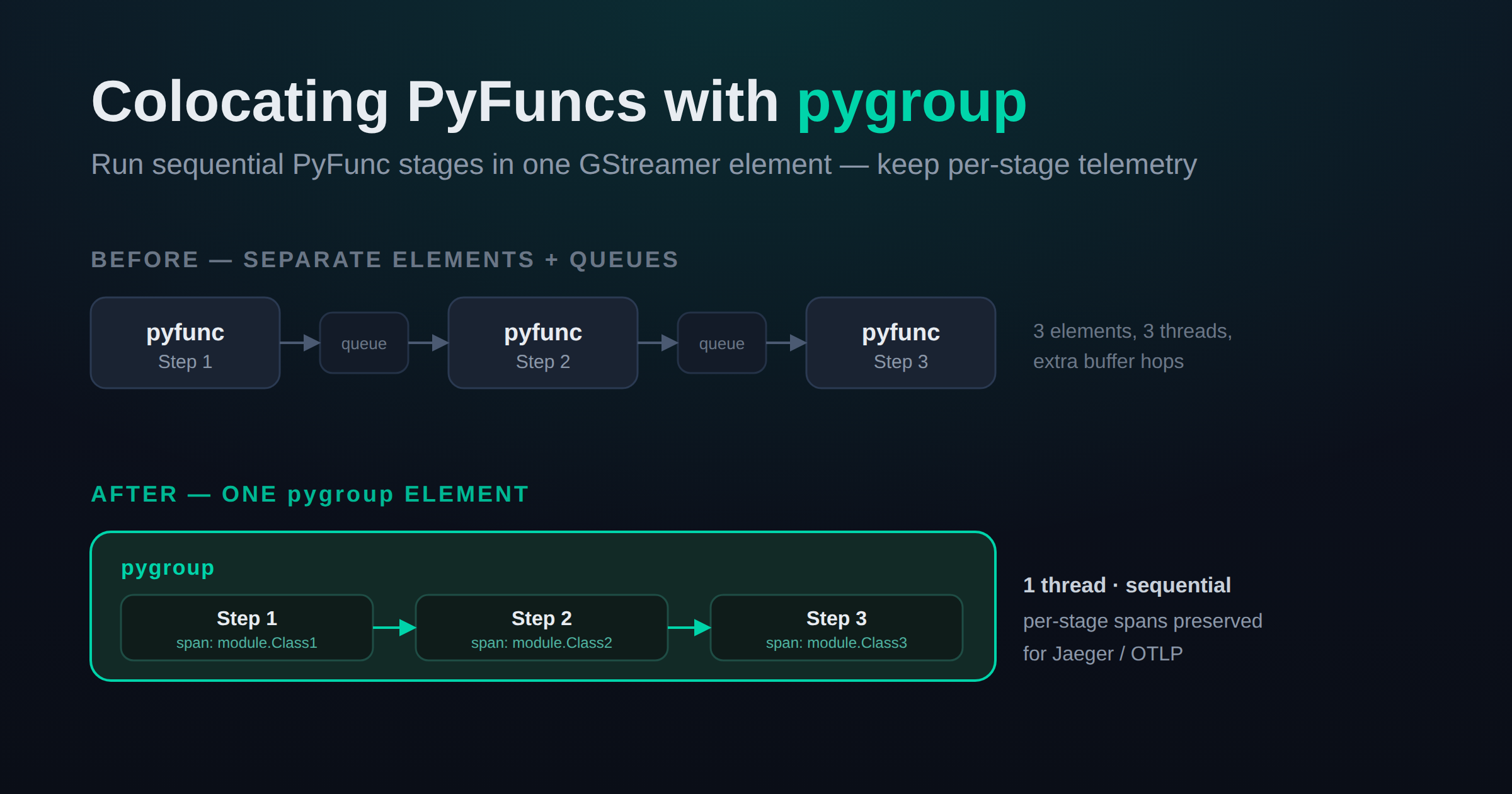
Savant pipelines are built from elements, and one of the most-used building blocks is the PyFunc — a Python class that processes every frame. It is common to chain several PyFuncs one after another: convert metadata, run inference post-processing, draw overlays, publish auxiliary streams, and so on. Until now, each of those stages had to be a standalone GStreamer element, with the framework inserting a queue between every neighboring PyFunc.
That works, but it is not free. Every element boundary is a hand-off: an extra queue, another thread, and additional buffer bookkeeping. When you have a handful of small, sequential PyFuncs that always run together, paying that price at each boundary is pure overhead.
The new pygroup element removes it. pygroup lets you colocate multiple sequential PyFuncs inside a single GStreamer element. They execute one after another on every frame, in a single thread, without queues in between — and, importantly, each colocated PyFunc still gets its own telemetry span, so you lose nothing in observability.
Compatibility Note: pygroup is available in Savant develop and ships in the upcoming release.
Before and After
A traditional chain of three PyFuncs looks like this in the pipeline graph:
pyfunc(Step 1) → queue → pyfunc(Step 2) → queue → pyfunc(Step 3)
Three elements, three threads, and buffers copied across each boundary. With pygroup, the same three stages collapse into one element:
pygroup[ Step 1 → Step 2 → Step 3 ]
One element, one thread, sequential execution — and a distinct telemetry span per stage.
Syntax
A pygroup is declared like any other element, with an elements list that holds the individual PyFunc definitions. Each sub-element uses the familiar module / class_name / kwargs fields:
pipeline:
  elements:
    - element: pygroup
      name: overlays_group
      elements:
        - module: samples.pygroup.overlays
          class_name: HorizontalLineOverlay
          kwargs:
            aux_suffix: '-h'
            line_color_rgba: [0, 255, 0, 255]

        - module: samples.pygroup.overlays
          class_name: VerticalLineOverlay
          kwargs:
            aux_suffix: '-v'
            line_color_rgba: [255, 0, 0, 255]
The colocated PyFuncs run in the order they are listed. Everything you already know about PyFuncs applies inside a group: each sub-element is a regular NvDsPyFuncPlugin subclass, receives its own kwargs, and can create auxiliary streams, draw on frames, and read or write object metadata. Savant inserts the necessary queues around the group automatically, exactly as it does for a standalone pyfunc.
Telemetry Is Preserved Per Stage
Colocating stages should not turn them into an opaque black box. pygroup wraps every sub-PyFunc in its own nested span named <module>.<class_name>, sitting under a process-frame span for the group:
process-frame
├── samples.pygroup.overlays.HorizontalLineOverlay
│   ├── draw-horizontal-line
│   └── aux-stream-publish
└── samples.pygroup.overlays.VerticalLineOverlay
    ├── draw-vertical-line
    └── aux-stream-publish
In Jaeger or any other OTLP backend you can still profile each stage independently — see exactly how long “Step 1” versus “Step 2” takes on every frame — and PyFunc code can open its own nested spans for even finer detail. If you are new to tracing in Savant, our earlier post on OpenTelemetry in Savant is a good starting point.
A Runnable Sample
The PR ships a complete, runnable pygroup sample. It colocates two overlay PyFuncs: the first draws a horizontal line and a “Step 1” label, the second draws a vertical line and a “Step 2” label on top of it — a simple, visible demonstration that the stages run sequentially. Each stage also feeds its own auxiliary video stream at a different resolution, so the sample doubles as an example of combining pygroup with hardware-accelerated auxiliary streams.
The sample includes Docker Compose files for both x86 and NVIDIA Jetson (L4T) hosts, plus a preconfigured Jaeger + OTLP setup so you can inspect the per-stage spans out of the box:
git clone https://github.com/insight-platform/Savant.git
cd Savant/samples/pygroup

# x86 dGPU
docker compose -f docker-compose.x86.yml up

# NVIDIA Jetson
docker compose -f docker-compose.l4t.yml up
Then open the RTSP/WebRTC output from the Always-On-Sink and the Jaeger UI at http://localhost:16686 to watch the traces.
Jetson note. The L4T compose file uses the JPEG codec instead of H.264. Entry-level devices such as the Jetson Orin Nano do not have an NVENC hardware encoder, so JPEG keeps the sample running on the widest range of Jetson hardware. On x86 the sample defaults to H.264.
When to Reach for pygroup
pygroup is the right tool when you have several small, sequential PyFuncs that always run together and you want to trim the per-element overhead without giving up per-stage metrics. Typical cases:
- Metadata conversion followed by inference post-processing.
- A series of lightweight drawing/overlay steps.
- Any fixed chain of Python stages where the queues between them buy you nothing.
If your PyFuncs are heavy and benefit from running on separate threads in parallel with the rest of the pipeline, the classic standalone pyfunc elements are still the way to go. pygroup is about consolidating chains that are already effectively serial.
Wrapping Up
pygroup is a small addition with a practical payoff: fewer elements and threads for serial PyFunc chains, the same simple configuration syntax, and no loss of observability thanks to per-stage telemetry spans. Grab the sample, try it on your own PyFunc chains, and let us know how it goes.
As always, join our Discord for help and Savant news, and star the project on GitHub.